AI implementation for architecture and engineering firms
AI works in a firm as a layer over the systems you already run: your ERP, your project mail, your models, your standards. We help firms plan that layer, build it, and staff it, across the Microsoft and Google ecosystems, without a stake in any vendor.
What we do
We advise on which path fits your firm, which tools to avoid, and who should do the work, and we build what follows.
Advice before you spend
We tell you which path fits your firm and which tools to skip, so the first project starts on the right foot instead of the popular one.
Tool evaluation on your own work
We test candidates on your documents, your projects, and your people, and score them on data reach, adoption effort, reversibility, output quality, integration, and cost.
Implementation, or a referral
We build when it fits our skills: data pipelines, assistants, dashboards, custom tools. When a job needs a Notion consultant, a BIM manager, or an IT partner, we say so and help you hire one.
Strategy and data work
We work at the leadership level on what to build, buy, or stop, and at the detailed level on cleaning finance, project, and employee data so every system above it can be trusted.
Examples
Six pieces of work, across the Microsoft and Google ecosystems. Each starts from data the firm already has and ends with a person checking the output.
Firm data
A data lake on Microsoft Fabric
Project, financial, and staff data live in separate systems and arrive messy: a title stored as an ID, a timesheet line without a project. We pull it into one lake on Fabric, clean it in layers, and build dashboards on project health, utilization, and finance, so partners see burn rate per phase in a week instead of at closeout. Once the trusted layer exists, Copilot can answer questions against it.
How the layers workMicrosoft 365
Copilot set up so it finds your answers
Out of the box, Copilot found a reimbursement figure in a travel policy and missed the employee definitions in the handbook. We test retrieval on your own documents, set up Purview labels and security groups so it only sees what each person may see, and roll it out in waves with champions per studio.
The governance stepsGoogle Workspace
An email draft assistant, as a small example
For a customer-facing business on Gmail we built an assistant that reads incoming mail, checks the calendar, looks up real prices and policies, and writes a reply draft in the company's voice. A person sends every one. Code took two days, and the six knowledge documents and the weekly tuning loop are what make it accurate. The same shape fits a firm's RFI log or client inbox.
The case studyAEC Hub Platform
Firm knowledge and project knowledge, in one assistant
The platform connects a firm's models, project mail, standards, and proven workflows so an assistant can answer with citations, run checks against the model, and draft from the project record. It is how we show what firm-level and project-level context does to an answer.
See the platformAEC Hub Proposals
Proposal drafts grounded in your past work
Proposals draws on approved firm language, project experience, and staff qualifications to draft against a solicitation, with unresolved facts left visible rather than invented. Firms evaluating vendor proposal generators use it to see what a grounded draft looks like before paying for one.
See ProposalsCustom tools
Claude rules and skills for firm practice
In side-by-side tests Claude did better than ChatGPT on most firm tasks. We set up shared rules and skills so proposal language, report structure, and QA checklists are the same for everyone, instead of living in one person's prompts.
The Claude field guideThe first call is free and takes 30 minutes.
Book a free AI strategy sessionConcrete examples.
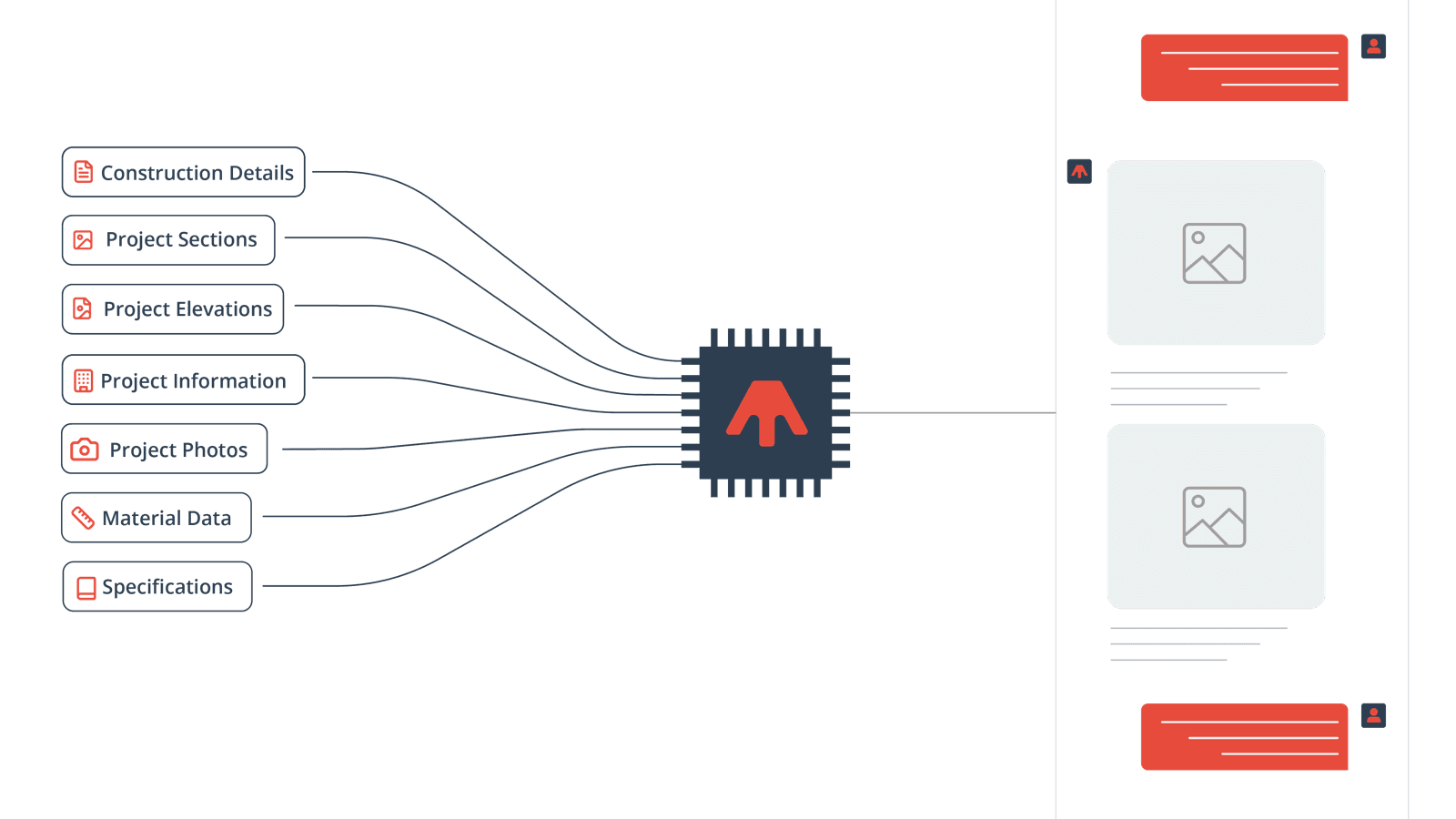
AEC Hub tool
An intelligence layer over firm knowledge
Aané connects a firm's construction details, sections, elevations, specs, and photos into one searchable knowledge base, deployed inside a national engineering firm today.
See the Aané review* Built by Akhil Hemanth
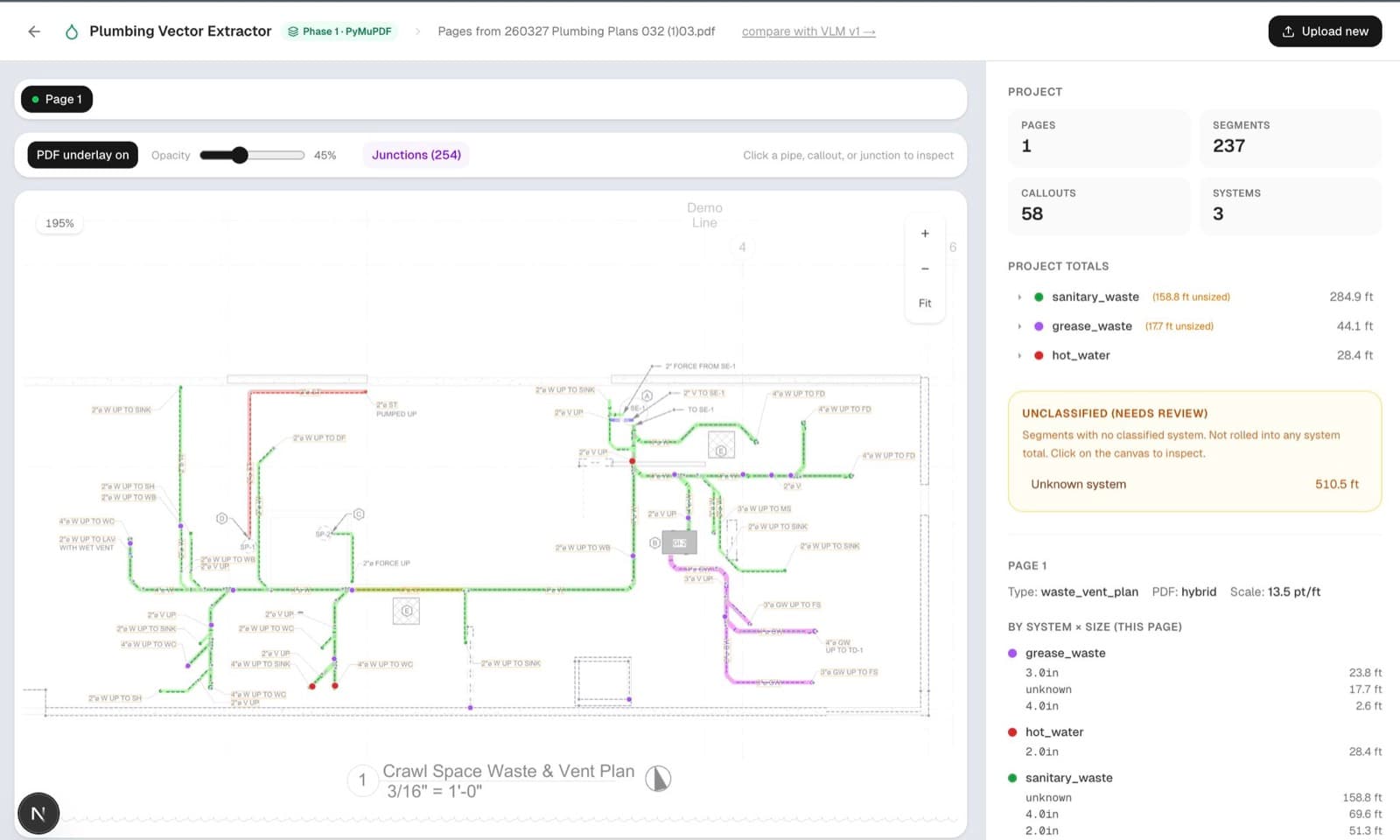
Built for a client
Weeks of manual takeoff, done in minutes
A plumbing takeoff tool built for an engineering client who was scanning plans by hand for pipe lengths and sizes. Every segment stays reviewable: the engineer can inspect, verify, and reclassify anything on the plan. Never a black box.
Ask about custom builds* Built by AEC Hub
See more examples of practical AI built for AEC work.
View case studiesCase study: a reply-draft assistant
Wood Thumb, a San Francisco woodshop and design studio with one support inbox, answered the same questions by hand every day. We built an assistant that reads each incoming email, checks the calendar, looks up the real prices and policies, and writes a reply draft in the company's voice into Gmail Drafts. A person reads and sends every one, so nothing goes out on its own.
The code took one to two days. The knowledge took longer: six Google Docs the client edits themselves, covering hard facts, judgment rules, response playbooks copied from real emails, escalation triggers, the voice derived from about 600 sent emails, and a plain-English overview. A nightly job rebuilds the search index, so a price change made today is live tomorrow.
A weekly report compares every draft to what was sent and shows the lines that changed. Each change goes back into a document: a wrong number to hard facts, a missing offer to judgment rules, a tone problem to the voice file. That loop is what keeps the output improving after we leave, and it is the same loop we run for an RFI log or a client inquiry address inside a firm.
Customer service email has gone from hours a day to minutes. I knew the technology existed. I just needed an AI wizard to make it work for our business.
Systems we work with
We are not tied to any vendor. Below is the short version of what we tell firms about each system: where it helps, and where it falls short.
Microsoft 365, Copilot, Fabric, Purview
Our default for firms already on Microsoft. Fabric for the data layer, Purview for permissions, Copilot for retrieval once both are in place.
Google Workspace and Google Cloud
Gmail, Drive, and Calendar with Gemini and Vertex AI Search behind a small service. Cheaper to build against and simpler to own for smaller firms.
Autodesk Construction Cloud, Forma, Revit
Model and document data we can pull out and query: system counts, duct lengths, door clearances, without opening the model.
Unanet and Deltek
Project, timesheet, and financial truth, behind APIs that need cleaning. Unanet's proposal generator is priced high for what it does, and a custom build usually costs less.
Egnyte
Common for firm files and shared with clients. Its built-in AI is a starting point. The question to ask is what it cannot reach.
Zoom, Teams, and meeting transcripts
Transcripts and notes can flow into Monday.com, Notion, or your project system so decisions and owners are captured without retyping.
Notion, Monday.com, and project tools
Notion strains as operations grow. If you go that route, plan for a dedicated implementation specialist, or evaluate alternatives first.
Claude and ChatGPT
Both, with firm-level rules and skills. Claude wins most drafting and analysis tasks in our tests.
InspectMind, Pirros, Scribe, and the rest
Plan and report checkers, detail libraries, process documentation. We check overlap with what you already own before recommending any of them.
The first call is free and takes 30 minutes.
Book a free AI strategy sessionAreas of focus
Data
Finance, projects, employees, and utilization in one clean layer, with dashboards and burn rate per phase.
Employee knowledge
Policies, standards, and past work, findable through Copilot or a custom assistant with permissions that hold.
Meetings and field notes
Transcripts turned into decisions, owners, and dates that land in the project system.
Scheduling and resources
People, availability, workload, milestones, and deadlines, with the right tool for your size.
Writing
Reports, marketing and business development, email, training content, and proposals, drafted from your own material.
BIM and CAD
Model data pulled out for analysis, plan and report checking, and detail reuse.
The first call is free and takes 30 minutes.
Book a free AI strategy sessionGuides
Everything below is free to read. The platform learn page adds four visual guides on models, harnesses, workflows, and the operating layer.
AI implementation for A/E firms
Clean data, permissions, one workflow, a 90-day plan.
How should my architecture firm use AI?
Where AI pays back first and what to avoid.
One-month AI implementation
Four projects with a named owner and a working pilot at the end.
Verifiable AI architecture
How an assistant shows its work so a firm can trust it on fees and liability.
The 4Es technology strategy
Exploration, effort, efficiency, and expense: a way to decide what to build or buy.
AI systems for AEC firms
Interactive study guide on models, harnesses, and workflows.
How we make AI useful for AEC firms
Visual guides and the firm AI operating model, on the AEC Hub platform.
AI strategy retainer
From $1,000 a month, scaled to the involvement your firm needs: a working session with leadership each month, answers on any tool or vendor question within a business day, and help getting one workflow into production each quarter. Firms that want a plan first take the $5,000 discovery and definition sprint.