Xenmark
QA/QCBrowser PDF drawing review with numbered comments, statuses, revisions, and exports
What is Xenmark?
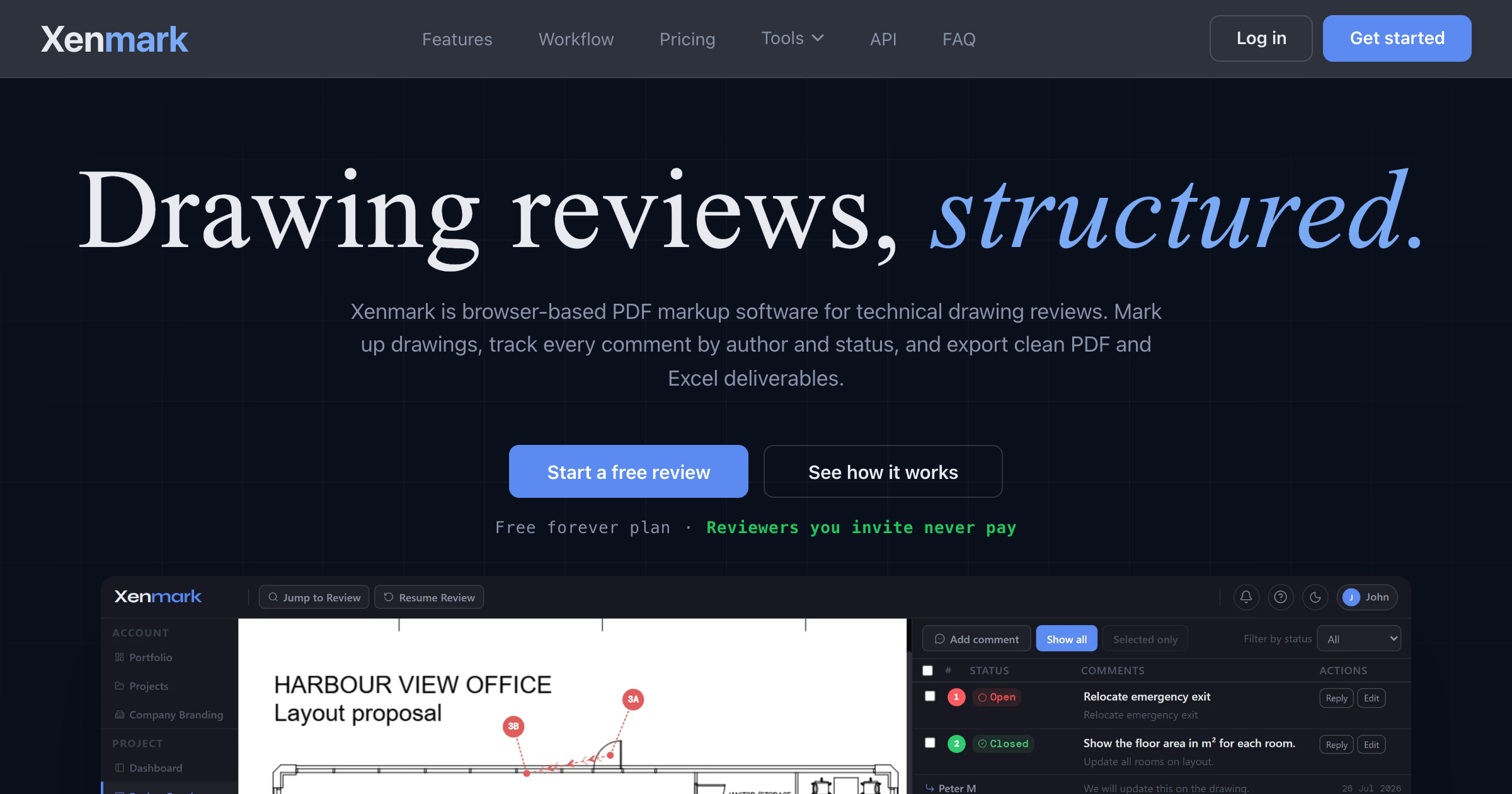
A browser tool for teams that receive technical drawings from someone else, such as an owner reviewing a consultant's package or a contractor checking an engineering firm's set. You upload a PDF, reviewers place numbered pins, rectangles, and callouts on the drawing, reply in threads with image attachments and mentions, and set a status on each point. A new revision uploads into the same drawing slot, earlier comments stay tied to the revision they were made on, and the review exports as a PDF comment plan and an Excel list that share the same numbering. Only the person running the project needs a paid plan, and invited reviewers join free.
Record written 2026-10-07 from the vendor's submission and site. Made by Xenmark AS, a Norwegian company with organisation number 937 996 799. The app runs at my.xenmark.app and a free API with personal tokens reads project data.
Key strengths
- Numbered pin, rectangle, and callout comments sit on the PDF itself and carry the same number into the exports
- each comment has a status, threaded replies, image attachments, and mentions
- a new revision goes into the same drawing slot and earlier comments stay attached to the revision they were made on
- PDF comment plan and Excel list export are on every plan and every role
- a timestamped activity log records who did what
- three roles, Project Manager, Editor, and Participant, with invited reviewers joining free
- nothing is installed and the free plan has no time limit
Common use cases
Limitations to know
Xenmark reads PDFs only and does no CAD editing, drawing production, or model authoring. The vendor says it is not a document management system, permanent storage, certified document control, or a legal archive, and projects are deleted after closing, 7 days on Free, 180 days on Plus, and 365 days on Pro, so you must download the ZIP archive yourself. Plan limits are tight on Free, with three drawings per project and 20 MB per PDF, and the free API is read-only. Custom branding is on paid plans only, and AEC Hub has not tested the product.
At a glance
- Category
- QA/QC
- Best for
- Owner, Consultant, Engineer, Contractor, Facilities Manager
- Project phase
- DD, CD, Construction
- Typology
- All typologies
- Pricing
- Free is €0 with one active project, three drawings, three revisions per drawing, 20 MB per PDF, and five members, with no card and no time limit. Plus is €14.99 per month with three projects, five drawings, 75 MB PDFs, ten members, and custom branding, and Pro is €59.99 per month with 15 projects, 20 drawings, 150 MB PDFs, and 30 members.
- Integrations
- Imports PDF drawings only. Exports a PDF comment plan, an Excel list, and a ZIP archive of revisions, PDFs, attachments, and the activity log, and a read-only API with personal tokens is available.
Frequently asked questions about Xenmark
What is Xenmark?
A browser tool for teams that receive technical drawings from someone else, such as an owner reviewing a consultant's package or a contractor checking an engineering firm's set. You upload a PDF, reviewers place numbered pins, rectangles, and callouts on the drawing, reply in threads with image attachments and mentions, and set a status on each point. A new revision uploads into the same drawing slot, earlier comments stay tied to the revision they were made on, and the review exports as a PDF comment plan and an Excel list that share the same numbering. Only the person running the project needs a paid plan, and invited reviewers join free. Xenmark is a QA/QC tool reviewed on AEC Hub.
Who is Xenmark for?
Xenmark is best suited for owner, consultant, engineer, contractor, facilities manager working in the dd and cd and construction phases.
How much does Xenmark cost?
Xenmark pricing: Free is €0 with one active project, three drawings, three revisions per drawing, 20 MB per PDF, and five members, with no card and no time limit. Plus is €14.99 per month with three projects, five drawings, 75 MB PDFs, ten members, and custom branding, and Pro is €59.99 per month with 15 projects, 20 drawings, 150 MB PDFs, and 30 members.. Check the vendor's website for current details.
What are the key strengths of Xenmark?
Numbered pin, rectangle, and callout comments sit on the PDF itself and carry the same number into the exports. each comment has a status, threaded replies, image attachments, and mentions. a new revision goes into the same drawing slot and earlier comments stay attached to the revision they were made on. PDF comment plan and Excel list export are on every plan and every role. a timestamped activity log records who did what. three roles, Project Manager, Editor, and Participant, with invited reviewers joining free. nothing is installed and the free plan has no time limit.
What are alternatives to Xenmark?
Top-rated QA/QC alternatives reviewed on AEC Hub include Tuuli, MarkedUp, CODiii.
Free AI strategy session for your firm
A 30-minute working session: your workflows, the right tools, and quick wins you can start this month. Free, no obligation.