VidrRegister
DocumentationBuilds a drawing issue register and transmittal from PDF title blocks
What is VidrRegister?
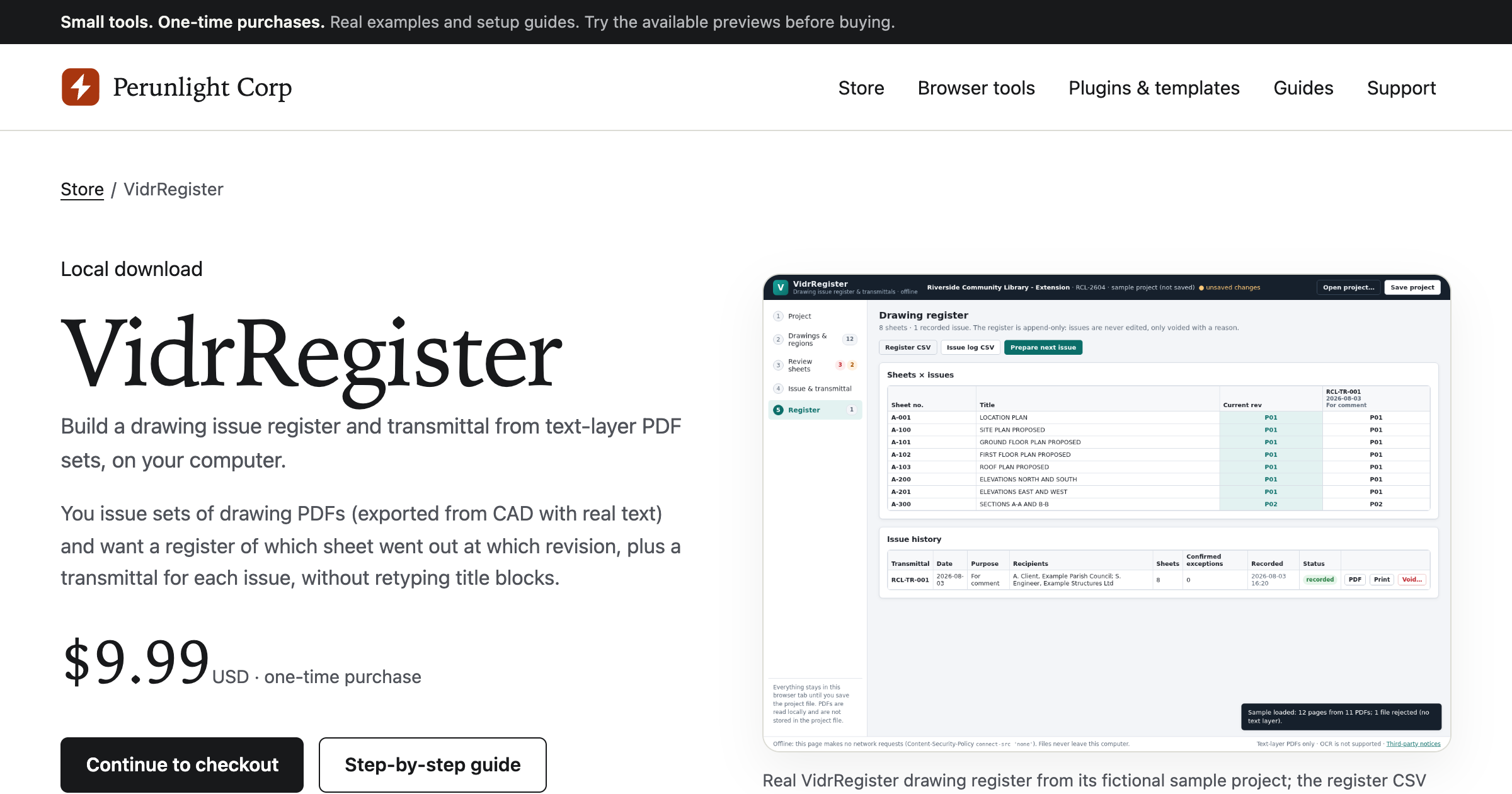
A one-time purchase tool that reads title blocks from text-layer drawing PDFs and produces a drawing register and transmittal. You unzip the download, open index.html in desktop Chrome, import a PDF set, drag boxes around the sheet number, title, revision, date, and status fields on one page per paper size, and the tool reads every page of that size the same way. A review step flags duplicates, filename mismatches, revision sequencing problems, and missing regions before you record an issue. It exports a CSV register, a PDF transmittal per issue, and a JSON project file, and nothing leaves the machine because there is no server or account.
Record written 2026-10-07 from the vendor's submission and site. Perunlight Corp is a brand run by a software operator in Ukraine and states on its site that it is not an incorporated company; it sells small one-time-purchase tools priced from USD 2.99 to 9.99.
Key strengths
- Reads sheet number, title, revision, date, and status from the text layer of drawing PDFs rather than requiring retyping
- title-block regions are mapped once per paper size and applied to every page of that size
- the review step counts duplicates, filename mismatches, revision sequencing errors, and missing regions before an issue is recorded
- exports a CSV register of sheets by issue and a printable PDF transmittal per issue
- saves a JSON project file so the setup can be reused on the next issue
- runs entirely in the local browser with no server, account, or upload
Common use cases
Limitations to know
It reads text layers only, so scanned drawings and PDFs with outlined text are rejected, and there is no OCR, CAD import, XLSX export, email sending, or cloud sync. Recorded issues cannot be edited, and data persists only in the saved project file. The vendor warns that PDF transmittals may substitute characters outside Helvetica and WinAnsi encoding and that very large PDF sets can slow the tool. The vendor tested it only in Chrome 152 on Linux with synthetic drawing PDFs, and it requires desktop Chrome with a mouse or trackpad. AEC Hub has not tested the product.
At a glance
- Category
- Documentation
- Best for
- Architect, Engineer, Project Manager, Office Manager, BIM Manager
- Project phase
- DD, CD, Construction
- Typology
- All typologies
- Pricing
- USD 9.99 one time, with no subscription; the final total and any tax appear at checkout.
- Integrations
- Imports drawing PDFs that carry a text layer, such as CAD or BIM exports. Exports CSV, PDF, and a JSON project file, and connects to nothing else.
Frequently asked questions about VidrRegister
What is VidrRegister?
A one-time purchase tool that reads title blocks from text-layer drawing PDFs and produces a drawing register and transmittal. You unzip the download, open index.html in desktop Chrome, import a PDF set, drag boxes around the sheet number, title, revision, date, and status fields on one page per paper size, and the tool reads every page of that size the same way. A review step flags duplicates, filename mismatches, revision sequencing problems, and missing regions before you record an issue. It exports a CSV register, a PDF transmittal per issue, and a JSON project file, and nothing leaves the machine because there is no server or account. VidrRegister is a Documentation tool reviewed on AEC Hub.
Who is VidrRegister for?
VidrRegister is best suited for architect, engineer, project manager, office manager, bim manager working in the dd and cd and construction phases.
How much does VidrRegister cost?
VidrRegister pricing: USD 9.99 one time, with no subscription; the final total and any tax appear at checkout.. Check the vendor's website for current details.
What are the key strengths of VidrRegister?
Reads sheet number, title, revision, date, and status from the text layer of drawing PDFs rather than requiring retyping. title-block regions are mapped once per paper size and applied to every page of that size. the review step counts duplicates, filename mismatches, revision sequencing errors, and missing regions before an issue is recorded. exports a CSV register of sheets by issue and a printable PDF transmittal per issue. saves a JSON project file so the setup can be reused on the next issue. runs entirely in the local browser with no server, account, or upload.
What are alternatives to VidrRegister?
Top-rated Documentation alternatives reviewed on AEC Hub include Document Crunch, Disperse.io, Archie Knows.
Free AI strategy session for your firm
A 30-minute working session: your workflows, the right tools, and quick wins you can start this month. Free, no obligation.