HodrBoard
DocumentationOffline browser app that converts competition boards into correctly sized, named JPEGs
What is HodrBoard?
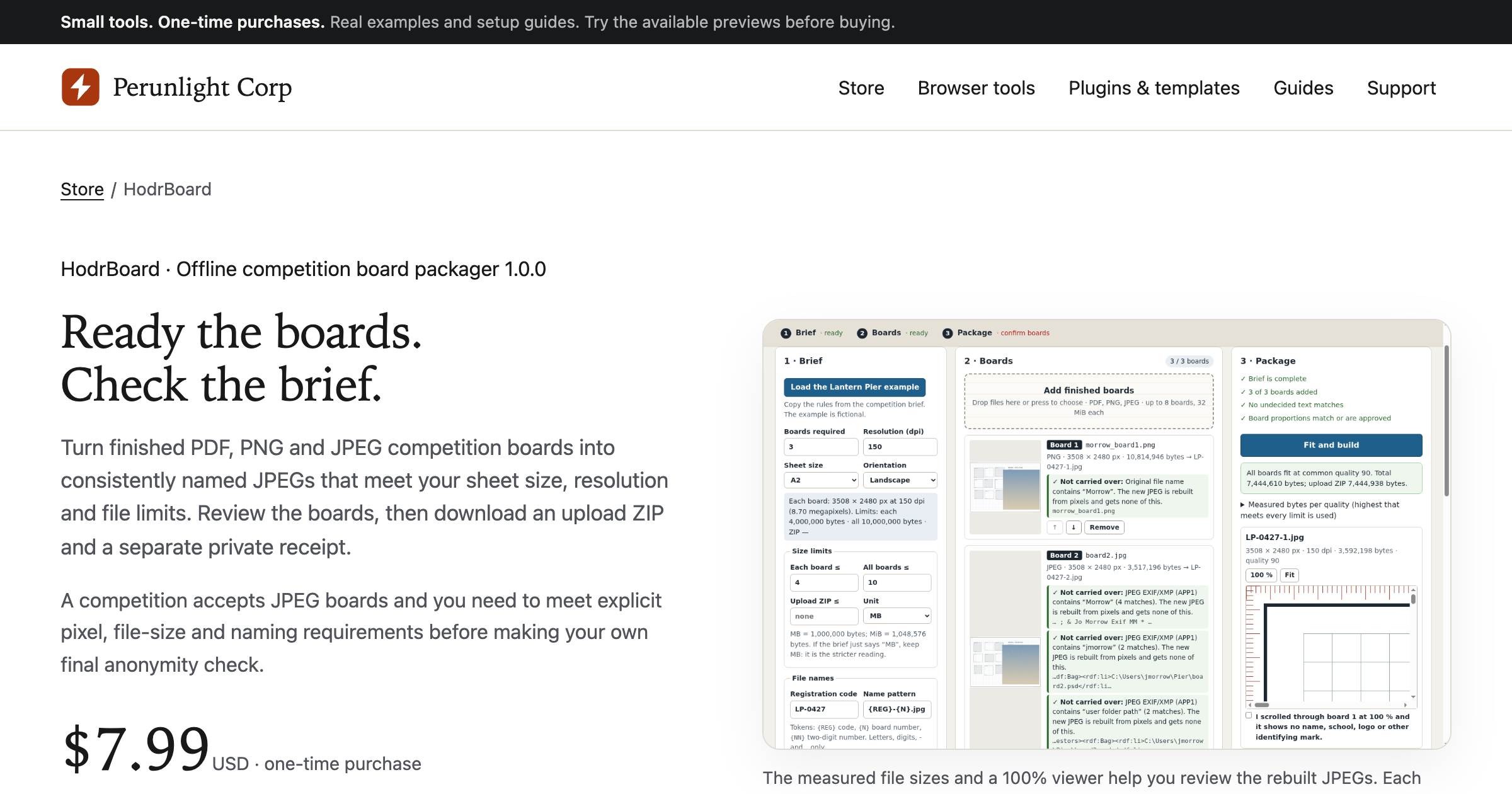
A one-time purchase for architecture students and small studios submitting to a competition that accepts JPEG boards. You open HodrBoard.html in desktop Chrome, enter the brief's sheet size, orientation, resolution, board count, and file size limits, and load up to eight PDF, PNG, or JPEG boards. The app converts them to JPEGs at the stated pixel size, picks the highest JPEG quality between 95 and 50 that meets every byte limit, applies one naming pattern across the set, and strips identifying metadata. The upload ZIP holds the renamed boards, and a separate private receipt records the original filenames, metadata findings, and file hashes for your own files.
Record written 2026-10-07 from the vendor's submission and site. Made by Perunlight Corp, a Ukrainian company that sells small one-time-purchase browser tools, plugins, and spreadsheet templates priced from $2.99 to $9.99.
Key strengths
- Runs entirely offline from an extracted ZIP in desktop Chrome, so boards never leave your machine
- one common JPEG quality across the set, chosen as the highest level from 95 to 50 that fits every per-file and combined byte limit without shrinking pixels
- output dimensions follow the sheet size and DPI you enter
- flags identity terms found in filenames and metadata and asks you to decide on text found in PDFs
- warns on proportion mismatches and unsupported PDF elements and refuses to output a board it cannot make compliant
- produces an upload ZIP of anonymised JPEGs and a separate private receipt with original names and hashes
- a free illustrated manual and a fictional practice brief with three sample boards are linked from the product page
Common use cases
Limitations to know
The app handles up to eight boards at 32 MiB per file and 128 MiB total, 24 million pixels per source, 96 million pixels of total output, and 8,192 pixels on a side, so A1 at 150 dpi fits but A2 at 300 dpi does not. It is tested only on desktop Google Chrome, version 152 on Linux, and the vendor does not list other browsers. Inputs must be upright, untagged or sRGB, with no layers, encryption, or EXIF rotation, and the only output format is JPEG. It does not design or lay out boards, it only converts and names finished ones. AEC Hub has not tested the product.
At a glance
- Category
- Documentation
- Best for
- Student, Architect, Designer
- Project phase
- Concept
- Typology
- All typologies
- Pricing
- $7.99 USD one-time purchase with perpetual use of the purchased version on your devices for personal or internal commercial work. No subscription.
- Integrations
- Imports PDF, 8-bit RGB or grey PNG, and baseline or progressive RGB or grey JPEG. Exports JPEG only, packaged as an upload ZIP plus a separate private receipt.
Frequently asked questions about HodrBoard
What is HodrBoard?
A one-time purchase for architecture students and small studios submitting to a competition that accepts JPEG boards. You open HodrBoard.html in desktop Chrome, enter the brief's sheet size, orientation, resolution, board count, and file size limits, and load up to eight PDF, PNG, or JPEG boards. The app converts them to JPEGs at the stated pixel size, picks the highest JPEG quality between 95 and 50 that meets every byte limit, applies one naming pattern across the set, and strips identifying metadata. The upload ZIP holds the renamed boards, and a separate private receipt records the original filenames, metadata findings, and file hashes for your own files. HodrBoard is a Documentation tool reviewed on AEC Hub.
Who is HodrBoard for?
HodrBoard is best suited for student, architect, designer working in the concept phase.
How much does HodrBoard cost?
HodrBoard pricing: $7.99 USD one-time purchase with perpetual use of the purchased version on your devices for personal or internal commercial work. No subscription.. Check the vendor's website for current details.
What are the key strengths of HodrBoard?
Runs entirely offline from an extracted ZIP in desktop Chrome, so boards never leave your machine. one common JPEG quality across the set, chosen as the highest level from 95 to 50 that fits every per-file and combined byte limit without shrinking pixels. output dimensions follow the sheet size and DPI you enter. flags identity terms found in filenames and metadata and asks you to decide on text found in PDFs. warns on proportion mismatches and unsupported PDF elements and refuses to output a board it cannot make compliant. produces an upload ZIP of anonymised JPEGs and a separate private receipt with original names and hashes. a free illustrated manual and a fictional practice brief with three sample boards are linked from the product page.
What are alternatives to HodrBoard?
Top-rated Documentation alternatives reviewed on AEC Hub include Document Crunch, Disperse.io, Archie Knows.
Free AI strategy session for your firm
A 30-minute working session: your workflows, the right tools, and quick wins you can start this month. Free, no obligation.