AI plan checkers in construction: how they work and what they catch
A drawing error found in the field becomes a change order, a delay or a failed inspection. AI plan checkers run a first review of the set before construction so a licensed reviewer can confirm or dismiss each finding.
InspectMind AI wrote this article and supplied the screenshots and the Cold Summit Development example. AEC Hub edited it for length and style. InspectMind did not pay for it, and it does not change how InspectMind ranks in our recommendations.
What an AI plan checker does
An AI plan checker reviews architectural, structural, MEP and civil drawings against a set of rules: building codes, the project specifications and internal coordination requirements. A person would otherwise cross-reference hundreds of sheets against a code book by hand. The software does that first pass and flags each discrepancy for a licensed professional to confirm.
Markup and redlining software records comments that a person writes. A plan checker looks for the errors that usually only a full manual review finds: dimensional conflicts, missing details, code violations, and specifications that do not match what the drawing shows.
How the software works
Most plan checkers combine three parts.
Document parsing. The software reads the PDF or CAD set, separates the sheets, extracts dimensions, labels and callouts, and recognizes standard construction symbols.
A rules library. The software checks what it read against codes such as the IBC, IRC, NFPA and ADA. More advanced tools also check against the project's own specifications and drawing standards.
Cited findings. Each finding names the sheet, dimension or code section that triggered it, so the reviewer can check it in a few seconds without working the problem out again.
What a finding looks like
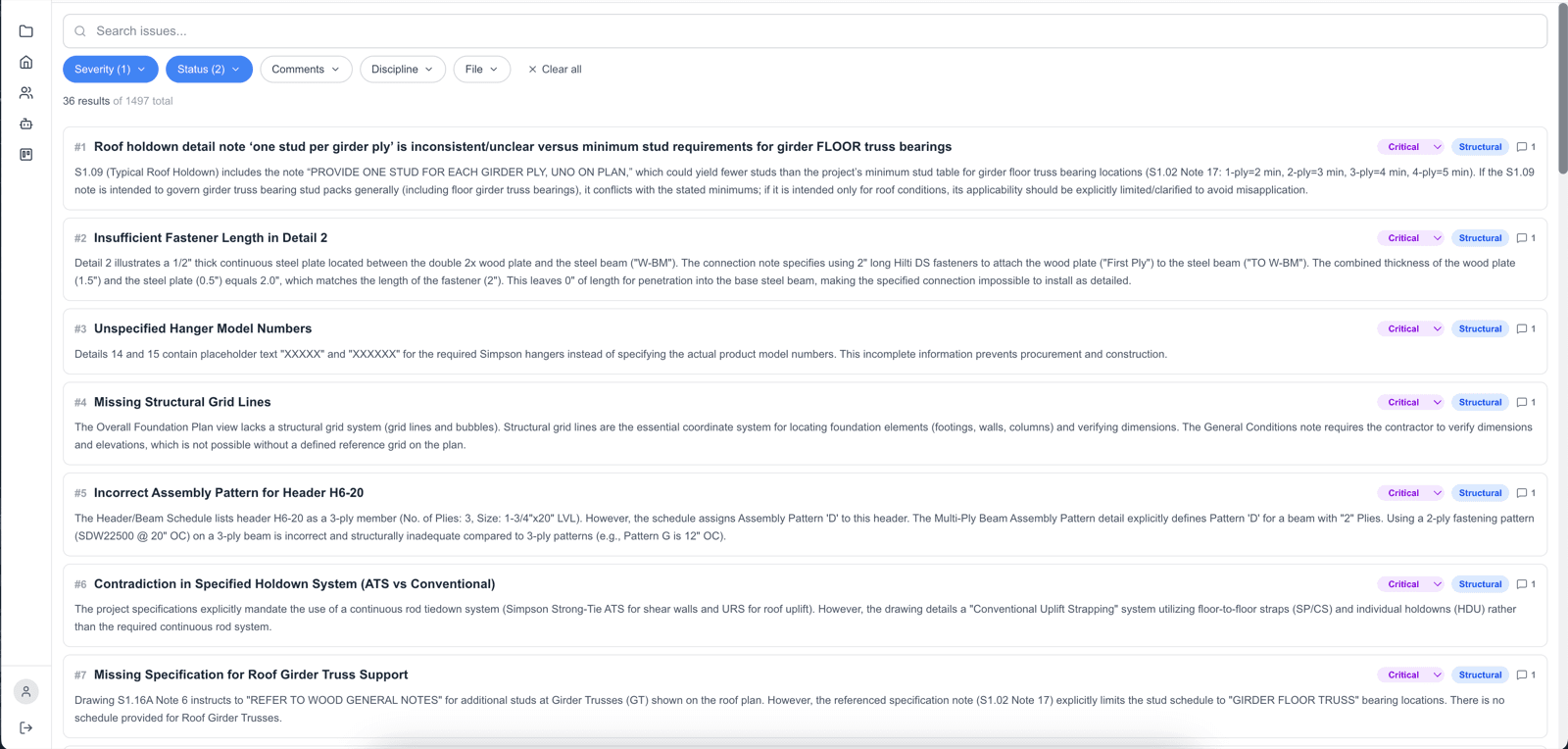
A plan check report is a list of findings. Each one has a sheet or drawing reference, the rule or code section it was checked against, a severity that separates a code violation from a minor coordination flag, and a short description a project engineer can act on.
In one review, the tool flagged Detail 5 on sheet A1.3, which calls for a PVC membrane boot at a pipe penetration. The roofing specification in Section 07540 requires a TPO system with compatible accessories. PVC and TPO cannot be heat-welded together, so the boot can fail early or void the roof warranty. The finding cited both documents and proposed an RFI: confirm the membrane type, and if it is TPO, revise the detail to call for TPO flashing to the manufacturer's standard.
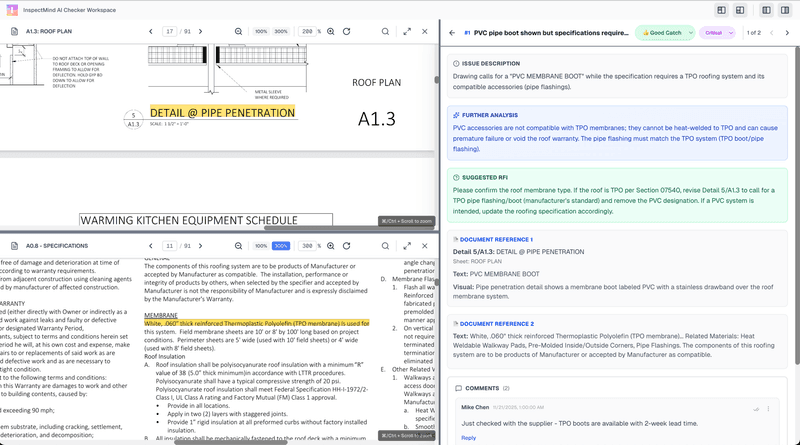
A finding like this names the conflict, points to two documents and gives the next step. A generic coordination warning gives the reviewer one more alert to investigate.
Cold Summit Development
Cold Summit Development builds temperature-controlled storage facilities in St. Augustine, Florida. According to InspectMind's published case study, Cold Summit ran a project set through InspectMind and found three issues before construction started.
- The door details showed pressure-treated wood blocking. The project specifications called for HDPE lumber, which does not degrade in cold storage the way treated wood can.
- The drawings specified a TPO membrane on the penthouses. The specification called for a fully adhered EPDM membrane, and that requirement sat in the refrigeration section instead of the roofing section.
- The drawings showed a 6 mil slip sheet where the specification required 10 mil, which matters for vapor barrier performance in freezer construction.
InspectMind says each of these would have surfaced as a failed inspection, rework or a durability problem if it had reached the field. The case study does not give a cost for them.
"InspectMind helped us catch real meaningful issues. Using it early in the process is going to absolutely help out in the field."Aaron Bass, Director of Construction, Cold Summit Development
What the software catches and what needs a licensed professional
Plan checkers handle four kinds of work:
- They cross-reference dimensions and specifications across a large set faster than a person can.
- They flag code issues that depend on a numeric or dimensional threshold.
- They find conflicts between disciplines, such as a beam that runs through an MEP duct route.
- They find missing details and callouts that disagree from sheet to sheet.
Four kinds of work stay with a licensed professional:
- The reviewer makes engineering judgments that depend on project context.
- The reviewer interprets the code where it is ambiguous.
- The architect or engineer of record signs and stamps the set.
- The reviewer accounts for site conditions that the drawings do not show.
The software's findings are a first pass, and a person confirms or dismisses each one before it becomes an RFI or a drawing revision.
What to check when you compare tools
Ask each vendor five questions:
- Does each finding point to the drawing, specification or code section behind it?
- Which codes and standards does the tool check, and which editions?
- How long does a set the size of yours take to process, measured on one of your past projects?
- Does the tool review architectural, structural, MEP and civil drawings, or only some of them?
- Is the tool priced per project, per sheet, per check or by subscription, and how does the cost change with project size? InspectMind, for example, starts at $50 per check and shows the exact price before you buy.
Some tools cover one discipline or one code. Some larger firms build their own reviewer on a general-purpose model such as Claude or ChatGPT, which gives them more control over the rules but less code coverage out of the box. Which fits depends on how standardized your review process already is and how much of it you want the tool to do.
You can compare InspectMind with other drawing review tools in our drawing review and QA guide or open its listing. For how AI review claims map to published benchmarks, see AEC-Bench mapped to the five levels of AI drawing review.
Get the next AEC tech analysis in your inbox
Original research on AEC tools, AI adoption, and industry data. Free, irregular cadence, easy unsubscribe.
Need help applying this to your firm?
We advise AEC firms on technology and AI strategy. Start with a free 30-minute AI strategy session: your workflows, the right tools, and quick wins you can act on.
Book a free AI strategy session